How Piano Analytics closes the QA gap no other vendor has solved
By Julien Coquet, Analytics Director @ Empirik, a certified Piano Analytics partner
Anyone who's worked in digital analytics knows the drill. Every new measurement project kicks off the same way: blank spreadsheet, data model built from scratch, tagging plan written up and shared with the dev team, then fingers crossed that what gets implemented actually matches what was spec'd. And the moment the site changes (which it always does) the whole thing starts shifting and drifting. A tagging plan is never truly finished. It's a living document, and it demands constant attention.
Piano Analytics has taken a hard look at this problem and responded with something genuinely worth your time: Data Sources Studio.
Start with structure, not a blank page
The premise of Data Sources Studio (DSS) is fairly straightforward: rather than asking every organization to reinvent the wheel, Piano Analytics' DSS ships pre-built, structured data sources tailored to specific industries and use cases. All you have to do is pick your industry vertical, and bam! you get a ready-made data model. Not a generic starter kit, but one built around the questions your business is actually trying to answer.
The behavioral data sources currently available cover:
Core Analytics. Covers the fundamentals such as vanity metrics (page views, sessions, clicks) as well as basic dimensions such as traffic sources. This is enabled by default for everyone.
Publishing. For media and content publishers.
Retail. For… e-commerce!
Banking. Financial services.
Health. Healthcare.
AV Insights. Video and audio tracking, straight from Piano Analytics' media API.
Sales Insights. Transaction tracking.
Don't see yours in the list? Fear not! More verticals are in the pipeline.
Your new 3-step exercise routine: Tailor → Implement → Monitor
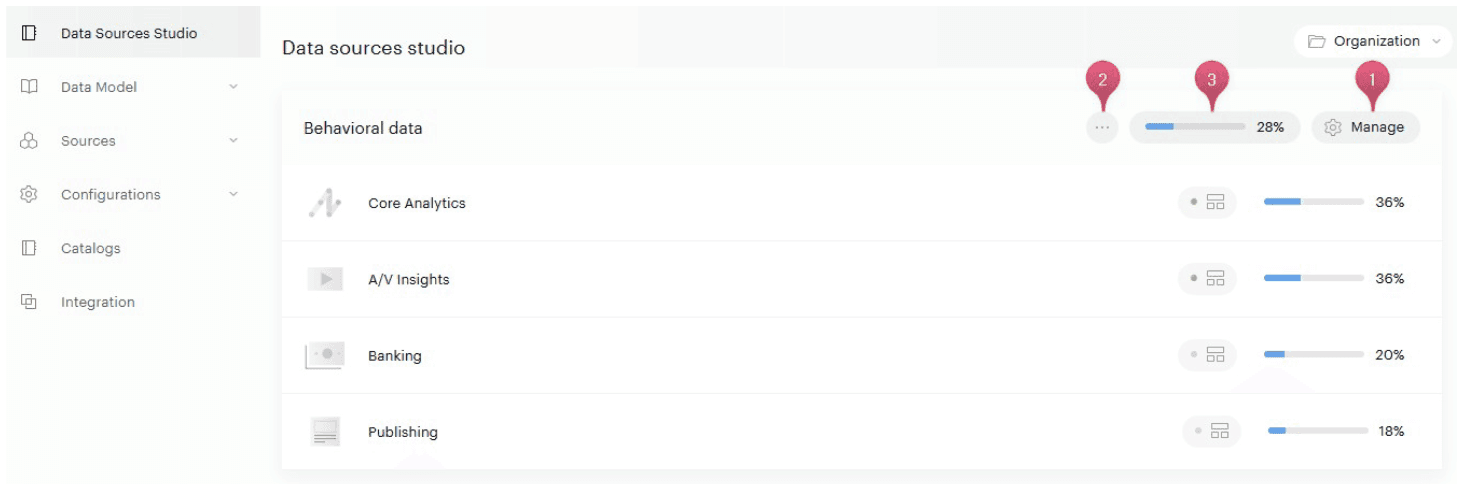
What makes DSS actually practical is how it maps itself onto the real workflow of an analytics project, but each phase can address a different person on the team.
Tailor: make it yours
This is where you take the default data source and shape it to your site's reality. Two views help you navigate it:
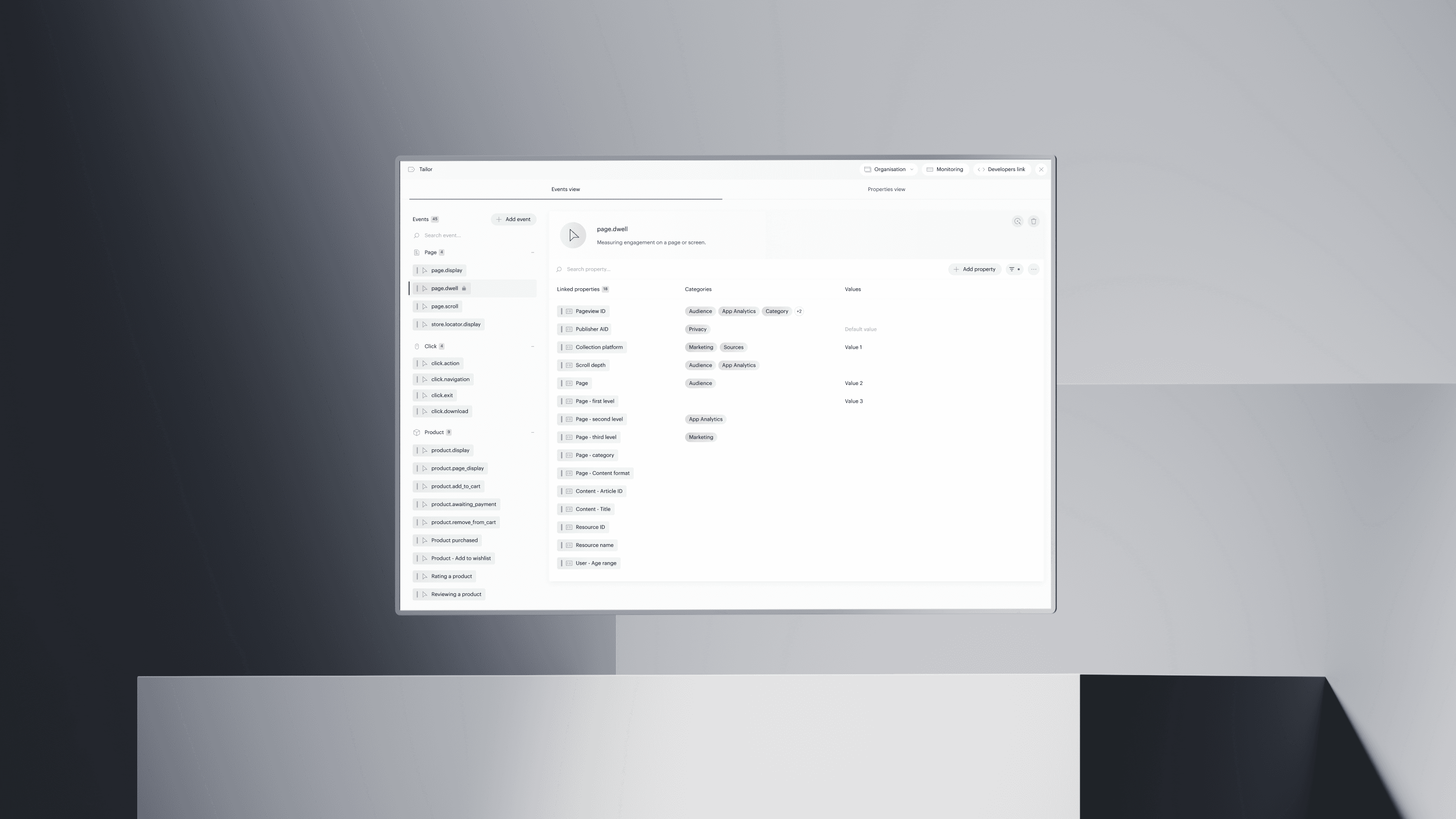
Events view: events on the left, associated properties on the right
Properties view: the flip side of the coin, useful for checking consistency across your full property set
The standout detail here is the trigger description field on each event. It's free text, and it matters: whatever you write there, e.g. "fire when the user completes a video" or "send on successful form submission", flows directly into the developer guide generated in the next step. That's the kind of thing that usually gets lost between the analytics spec and the Jira ticket.
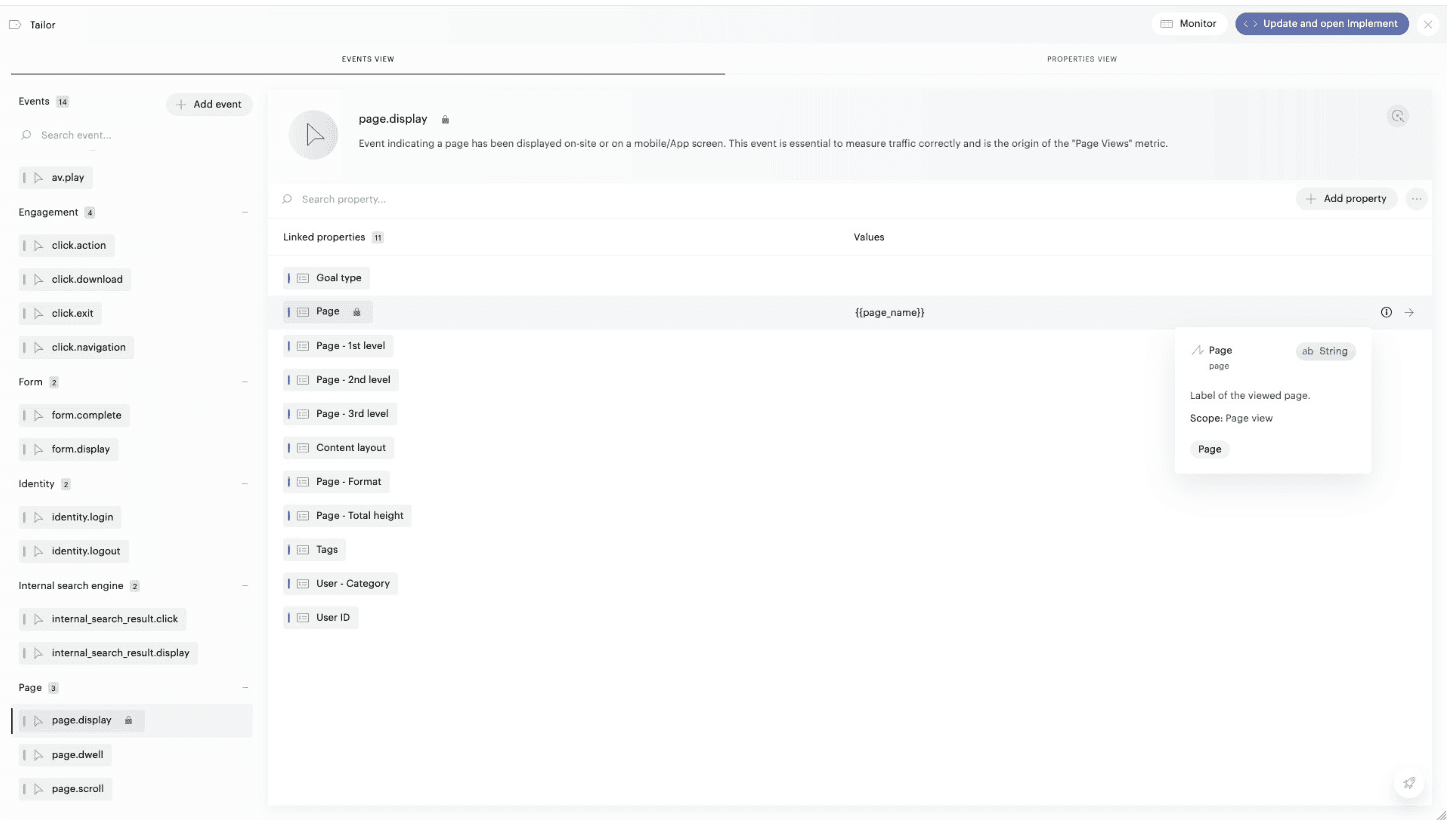
Elements marked with the padlock icon 🔒 are Board Required i.e. the minimum set of data points needed to unlock the out-of-the-box dashboard. They can't be removed, which is the right call: it keeps teams honest about their priorities. One thing worth flagging: Tailor shows you a single, unified view across all your active data sources. Publishing and AV Insights active at the same time? Everything appears in one place. No more cross-referencing multiple tagging documents.
Implement: a developer brief that writes itself
Once your plan is locked, clicking "Deploy to Implement" generates a technical implementation guide and publishes it to a shareable public URL that remains valid for six months, no Piano Analytics login required. All you have to do is send the link, and the developer can get to work.
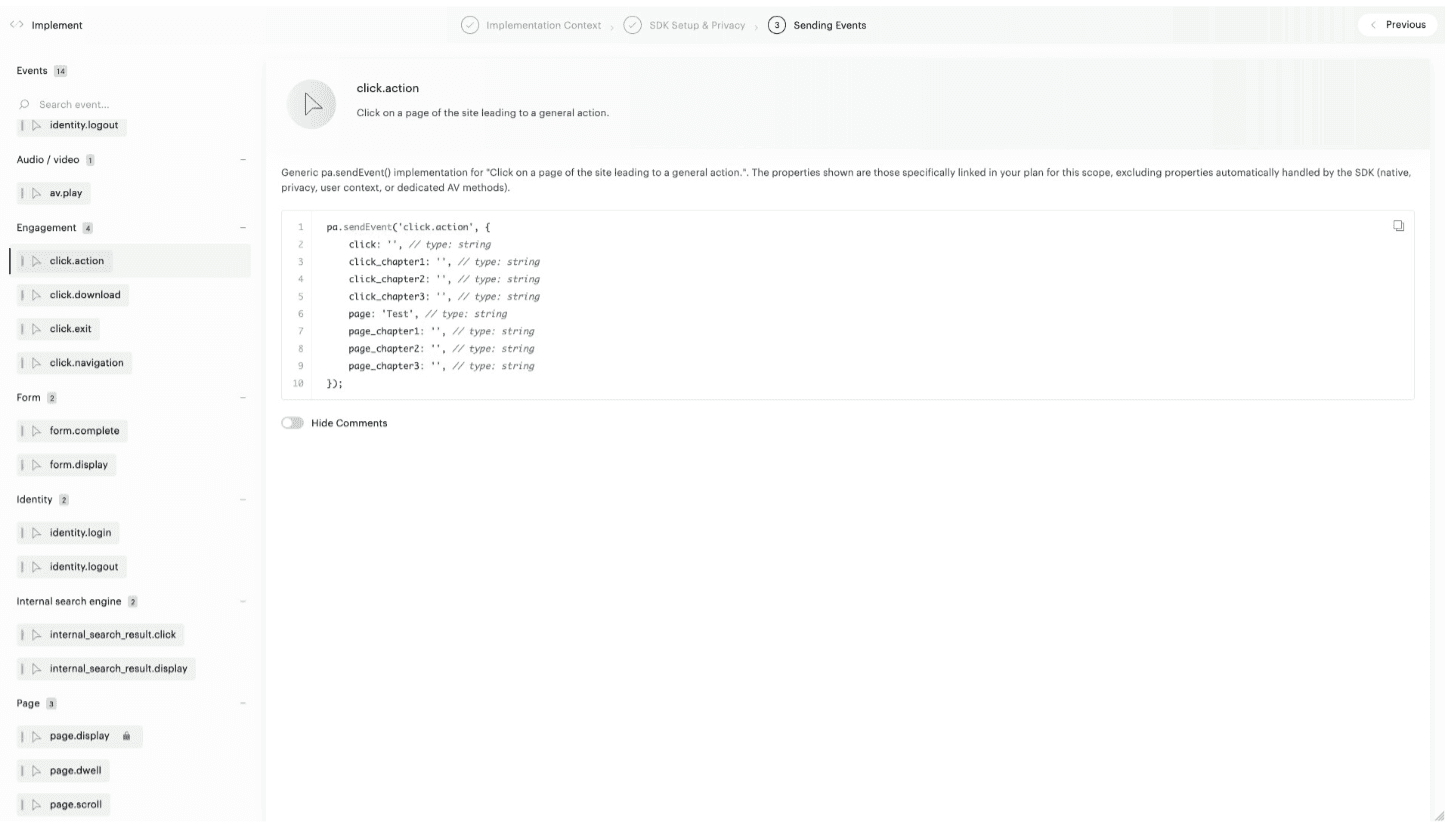
The guide is split into three areas:
Implementation context: select your technology stack (JavaScript or GTM as of today; Android/iOS coming soon), your target website, and your collection domain (including CDDC configs)
SDK & Consent: copy/paste initialization snippet, opt-in/opt-out setup, User ID
Event dispatch: the guide includes a pa.sendEvent() snippet for every event, with properties annotated by type and whether they're required
DSS can automagically generate all required Google Tag Manager elements! All that’s left to do is map variables with your existing data layer, and voilà!
The key point: this guide isn't generic. It reflects exactly what you configured in Tailor: your triggers, your defaults, your choices. Developers get a brief that matches the spec. No ambiguity, no "which version of the spreadsheet is current?" (hint: it’s the one that ends in “v99_final_version_ipromise.xlsx”)
And when things change (as they always do), all you have to do is update the Tailor section and hit "Deploy" again. Same URL, updated content.
Monitor: real time validation of your source of truth
Monitor closes the loop. It shows you in real time what's actually being collected against what was planned, over a rolling 30-day window, with handy color-coding:
Green: collected as expected
Grey: Board Required data missing → fix these first
Orange: unexpected data is being collected → worth investigating
Once everything is green across the board (literally), the OOTB dashboard deploys automatically in Piano Workspace. That's the payoff: from configuration to a working dashboard, without building anything manually.
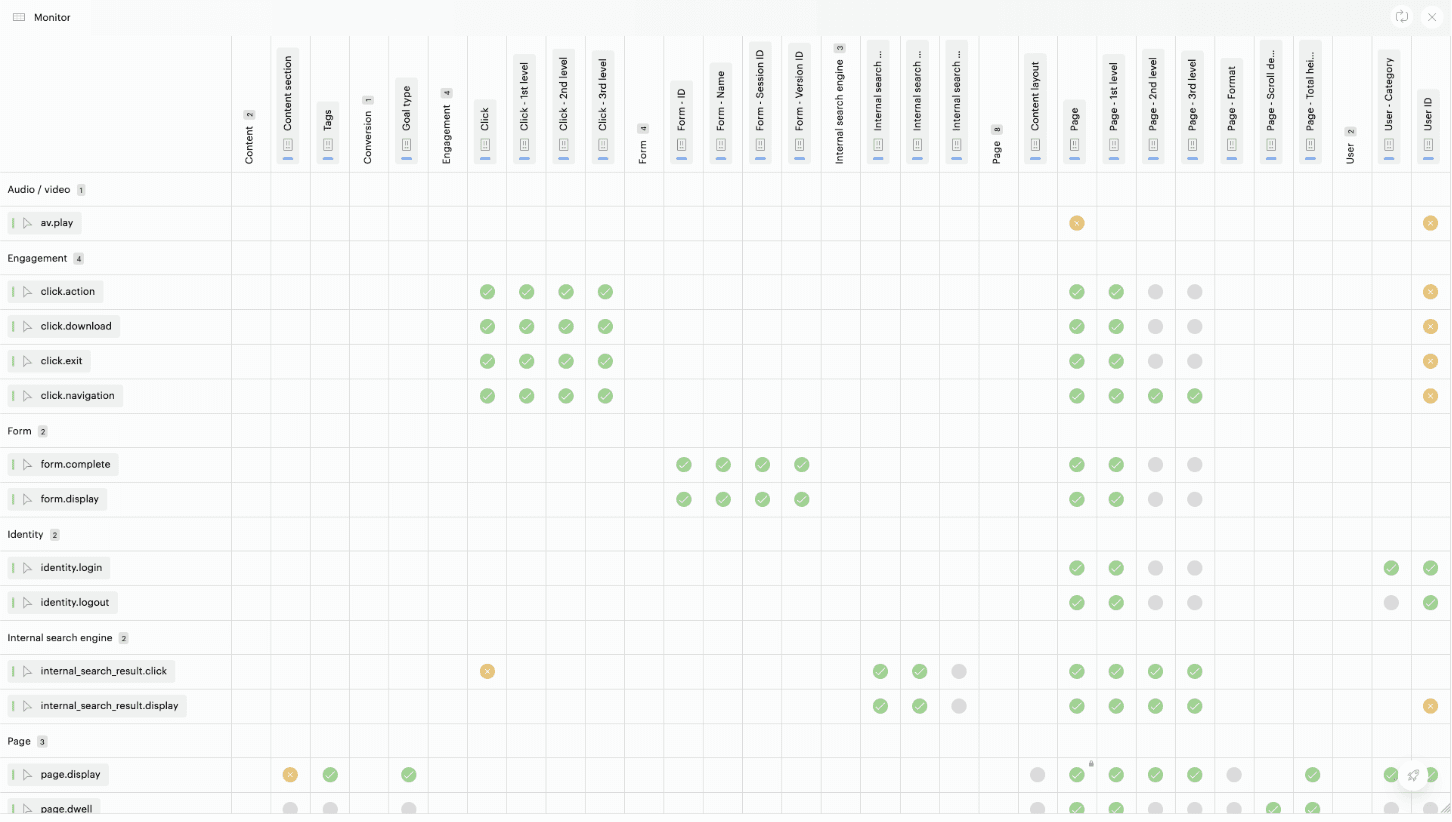
The main DSS view gives each data source two metrics:
Overall completion: how much of the full available event x property surface is being collected
Required completion: Board Required coverage only (needs to hit 100% to unlock the dashboard)
For analytics teams with a strong focus on data quality, the distinction is useful. Overall completion tells you how rich your model is. Required completion tells you whether your tagging requirements are in place.
What actually changes for analytics teams
Data Sources Studio is a game changer on multiple levels.
Spec’ing and scoping are faster. You're refining a structured model, not building one from scratch. The time saved on tagging plan authorship can go towards understanding the actual business questions.
The dev handoff is cleaner. The gap between what an analytics consultant specifies and what a developer implements is one of the most persistent sources of friction in the industry. Auto-generated, contextualized code snippets go a long way toward closing it.
The data-to-dashboard relationship is transparent. Teams know which events feed which dashboards. Prioritization becomes obvious.
Governance is future-proof. A unified plan with continuous monitoring means you always know what's being collected, and what isn't.
A few things to keep in mind
Here is an honest assessment of where DSS is at, at the time of this article:
Implement supports JavaScript, GTM and Android for now, with iOS support pending.
The public link can't be revoked. Factor that in if you're working in a sensitive context.
Contextual data sources (one-click connections to external data) are announced but not yet live.
Don’t miss the bigger picture
What's compelling about DSS isn't just the efficiency gain at implementation time. Piano is crystal clear about this: the more your data model aligns with their structured sources, the more you get out of the feature. You don’t just get OOTB dashboards, but better performance from the platform's AI features (anomaly detection, recommendations), which rely on normalized data to perform at their best.
Every completed source is a force multiplier. For teams building on Piano Analytics for the long term, Data Sources Studio should be part of the strategy from day one, although you can adopt it after your project is launched.
By now, you understand that Data Sources Studio is an awesome feature, and one that sets Piano Analytics ahead of the competition when it comes to implementation. As an expert consultant, I’ve always asked analytics vendors if they had plans to integrate quality assurance into their platforms. Sadly, no vendor ever did, which left us agencies and brands with 3rd-party QA solutions. DSS is a game-changer.
Considering a migration to Piano Analytics, or looking to enhance and polish an existing implementation? Get in touch with Empirik.